Opening: Making Audio Conversion Simple
Audio files come in many different formats, and not all of them work everywhere. You might have music on a CD, recordings on your computer, or files that won’t play on certain devices. Converting audio can solve these problems—but many tools feel complicated or technical.
That’s where winLAME makes a difference.
The latest version of winLAME focuses on one clear goal: make audio encoding simple, fast, and accessible—without sacrificing quality or control. It combines powerful encoding technology with an easy-to-follow interface, making it suitable for both beginners and experienced users.
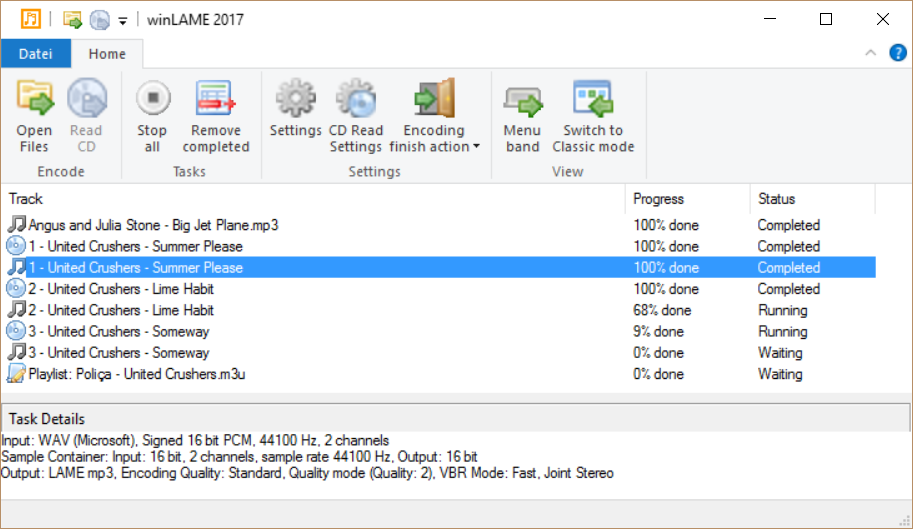
Whether you’re converting music, digitizing CDs, or preparing audio for sharing, winLAME helps you get the job done with minimal effort.
A Wizard That Guides You Step by Step
One of the standout features of winLAME is its wizard-style interface.
Instead of overwhelming you with technical settings, it guides you through the process step by step.
You simply:
- Choose your input (files or CD tracks)
- Select the output format
- Adjust quality settings
- Start encoding
Each step is clearly explained, so you always know what you’re doing.
This approach makes winLAME especially friendly for users who are new to audio conversion.
Support for Popular Audio Formats
winLAME supports a wide range of audio formats, including:
- MP3
- Opus
- Ogg Vorbis
- And other common formats
This flexibility allows you to:
- Convert files for different devices
- Reduce file sizes
- Improve compatibility
For example:
- MP3 is widely supported
- Opus offers high quality at smaller sizes
- Ogg Vorbis provides a good balance of quality and openness
You can choose the format that best fits your needs.
Powered by Proven Encoding Technology
At the heart of winLAME is the well-known LAME MP3 encoder.
This engine is trusted for:
- High-quality audio output
- Efficient compression
- Reliable performance
By using this proven technology, winLAME ensures that your encoded files sound clear and natural.
Even when reducing file size, it maintains a strong level of audio quality.
Convert Files or Rip Audio from CDs
winLAME gives you two main ways to work with audio:
1. Encoding Existing Files
You can load audio files from your computer and convert them into another format.
This is useful for:
- Organizing your music library
- Preparing files for different devices
- Reducing storage usage
2. Ripping Audio CDs
winLAME can also read tracks directly from audio CDs and convert them into digital files.
This allows you to:
- Preserve your CD collection
- Create portable versions of your music
- Store audio safely on your computer
The process is straightforward and guided by the same step-by-step wizard.
Smart Use of Multicore Processors
Modern computers often have multiple CPU cores, and winLAME takes advantage of this.
It uses parallel processing to:
- Encode multiple parts of audio at the same time
- Speed up the conversion process
- Improve overall efficiency
This means:
- Faster results
- Better use of your hardware
- Less waiting time
Even large batches of files can be processed quickly.
Batch Processing for Efficiency
If you have many files to convert, winLAME can handle them all at once.
You can:
- Add multiple files
- Apply the same settings
- Encode everything in one go
This saves time and reduces repetitive work.
It’s especially useful for:
- Large music collections
- Audio archives
- Bulk conversions
Balance Between Simplicity and Control
winLAME is designed to be easy to use, but it doesn’t limit you.
Beginners can rely on:
- Presets
- Recommended settings
- Guided steps
Advanced users can:
- Adjust bitrate
- Fine-tune encoding parameters
- Customize output settings
This balance makes winLAME suitable for a wide range of users.
Clean and Lightweight Design
winLAME is built to be efficient and responsive.
It:
- Starts quickly
- Uses minimal system resources
- Runs smoothly on most systems
You don’t need a powerful computer to use it effectively.
Offline and Private
winLAME works entirely on your local machine.
This means:
- No internet connection required
- No data uploads
- Full control over your files
Your audio stays private and secure at all times.
Ideal Use Cases
winLAME is useful in many everyday situations:
- Converting music for different devices
- Backing up audio CDs
- Reducing file sizes
- Preparing audio for sharing
- Organizing digital music libraries
It’s a practical tool for anyone who works with audio regularly.
Real-World Impact: Making Audio More Accessible
Audio conversion might seem like a small task, but it can make a big difference.
With winLAME, you can:
- Play your music anywhere
- Save storage space
- Keep your audio organized
It removes technical barriers and makes audio more accessible.
Conclusion: A Simple Path to High-Quality Audio
The latest winLAME shows that audio encoding doesn’t have to be complicated.
It combines:
- A guided interface
- Strong format support
- High-quality encoding
- Efficient performance
into one easy-to-use tool.
Whether you’re a beginner or an experienced user, winLAME provides a reliable and straightforward way to convert and manage your audio.
It’s a tool that quietly does its job well—helping your music and recordings fit seamlessly into your digital life.
License: Free and open-source
Website: https://winlame.sourceforge.io/index.html