Digital painting has become more accessible than ever, and Krita stands out as one of the most capable and artist-friendly tools available today. Designed specifically for illustrators, concept artists, texture creators, and visual effects professionals, Krita combines professional-grade features with an approachable interface—making it equally appealing to beginners and experienced creators.
What makes Krita especially compelling is its philosophy: it is built by artists, for artists. This focus is evident in every part of the software, from how brushes feel on the canvas to how easily you can organize your workflow. Below is a vivid and comprehensive look at what makes the latest generation of Krita such a unique and powerful creative tool.
A Natural Painting Experience: Tools That Feel Like Real Art
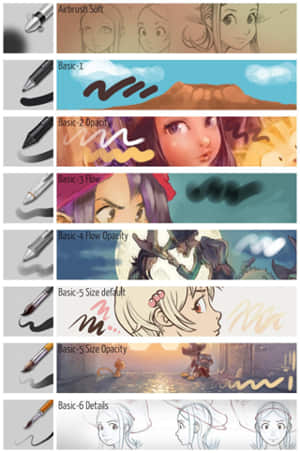
One of Krita’s strongest qualities is how natural it feels to paint. Instead of forcing you to adapt to the software, Krita adapts to you.
Key highlights:
- Advanced brush engines
Krita offers a wide variety of brush engines that simulate real-world tools like pencils, inks, and watercolors. Each brush can be deeply customized—down to how it responds to pressure, speed, and tilt. - Brush stabilizers for smoother lines
If you’ve ever struggled with shaky lines, Krita’s stabilizers can help. They smooth out your strokes in real time, making it easier to draw clean, confident lines. - Expressive textures and effects
Whether you want a rough charcoal look or a smooth digital finish, Krita allows you to create rich textures effortlessly.
👉 Example:
An illustrator working on a fantasy character can switch between a textured brush for sketching and a smooth inking brush for final lines—all without leaving the same toolset.
Intuitive Interface: Designed for Focus and Flow
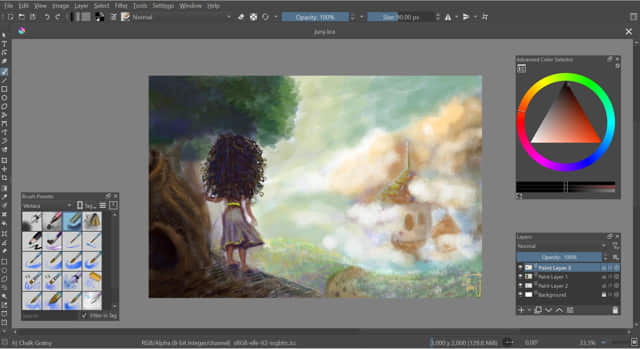
Krita’s interface is designed to stay out of your way, so you can focus on creating.
What makes it stand out:
- Clean and flexible layout
You can rearrange panels, hide tools you don’t need, and create a workspace that fits your style. - Pop-up palette
With a simple shortcut (often right-click), you can instantly access your favorite brushes and colors without interrupting your workflow. - Distraction-free mode
For deep focus, Krita allows you to hide all interface elements and work directly on the canvas.
👉 Example:
When painting a detailed environment, you can quickly pick colors from the canvas using the pop-up palette, keeping your attention on the artwork instead of menus.
Layers and Organization: Build Complex Artwork with Ease
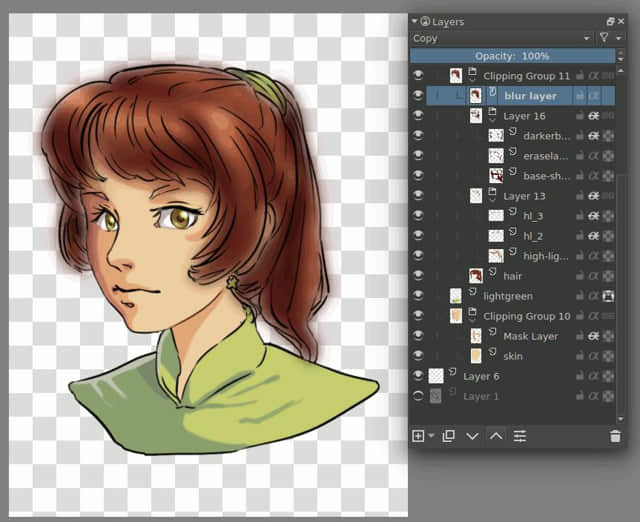
Modern digital art often involves many elements, and Krita provides powerful tools to manage them.
Core features:
- Layer system
Similar to other professional tools, Krita supports multiple layers, blending modes, and grouping. - Masks and filters
You can apply effects non-destructively using masks, meaning your original artwork remains untouched. - Flexible editing
Move, transform, and adjust parts of your artwork without affecting the rest.
👉 Example:
A concept artist designing a landscape can separate sky, mountains, and foreground into different layers, making it easy to adjust lighting or colors later.
Assistance Tools: Helping You Draw with Precision
Krita includes a set of intelligent tools that guide your drawing without restricting creativity.
Notable tools:
- Perspective assistants
Draw accurate buildings and environments with perspective guides. - Symmetry tools
Perfect for character design, patterns, or mandalas. - Rulers and shape assistants
Easily create clean lines, circles, and other shapes.
👉 Example:
When designing a cityscape, perspective assistants help ensure buildings align correctly, saving time and improving accuracy.
Seamless Patterns and Textures: Perfect for Design Work
For artists working in game design, illustration, or surface design, Krita offers excellent support for patterns and textures.
Key advantages:
- Wrap-around mode
Paint textures that repeat seamlessly across surfaces. - Pattern creation tools
Easily generate tiles for fabrics, backgrounds, or game assets.
👉 Example:
A texture artist can create a repeating brick wall pattern that fits perfectly when tiled in a game environment.
File Compatibility and Professional Workflow
Krita fits well into professional pipelines, making it more than just a standalone tool.
Important features:
- PSD support
You can open and save files compatible with Adobe Photoshop, making collaboration easier. - Wide file format support
Export your work in multiple formats for print, web, or animation. - Animation capabilities
Krita also includes basic frame-by-frame animation tools, allowing artists to create motion directly within the software.
👉 Example:
An illustrator can sketch and paint in Krita, then share layered files with a team using Photoshop without losing structure.
What Makes Krita Unique?
Krita stands out not just because of what it does, but how it does it.
1. Built specifically for artists
Unlike general-purpose image editors, Krita focuses entirely on painting and illustration.
2. Open-source and free
You get full access to professional tools without subscriptions or hidden costs.
3. Deep customization
From brushes to shortcuts, nearly everything can be tailored to your workflow.
4. Strong community
Artists around the world contribute brushes, tutorials, and feedback, helping the software evolve continuously.
5. Suitable for all skill levels
- Beginners can start painting quickly
- Professionals can rely on advanced features for production work
A Simple Creative Workflow Example
Here’s how an artist might use Krita in practice:
- Sketch the idea
Use a rough brush to outline the composition. - Refine the drawing
Switch to a cleaner brush with stabilization for line art. - Add base colors
Use layers to separate elements. - Apply shading and lighting
Use blending modes and textured brushes. - Add details and effects
Enhance the artwork with highlights and textures. - Export the final piece
Save in the desired format for sharing or printing.
Final Thoughts
Krita represents a modern approach to digital painting: accessible, flexible, and deeply powerful. It removes barriers that often prevent people from starting—such as cost or complexity—while still offering the tools needed for professional-quality work.
Whether you are sketching your first character, designing a game environment, or producing detailed illustrations, Krita gives you the freedom and capability to bring your ideas to life.
License: Free and open-source
Website: https://krita.org/