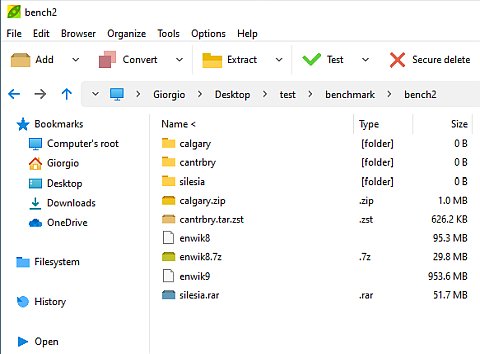
Managing compressed files is a routine part of digital life. Whether you are sharing documents, saving storage space, or organizing large collections of files, a reliable archiving tool is essential. PeaZip stands out as a powerful and versatile solution that combines ease of use with advanced capabilities.
As a free and open source file archiver, PeaZip offers much more than simple compression and extraction. It is designed to bridge the gap between simplicity and control, making it suitable for both everyday users and those who need deeper functionality.
A Free and Open Source Foundation
PeaZip is completely free to use and released under an open source license. This means you can use it for personal or professional purposes without restrictions.
Built on trusted technologies such as 7-Zip, Brotli, and Zstandard, PeaZip benefits from years of research and development in file compression.
Because it is open source, the software is transparent, regularly updated, and free from hidden advertising or unwanted extras. This makes it a dependable choice for users who value security and reliability.
Cross-Platform and Portable
PeaZip works across multiple operating systems, including Windows, macOS, and Linux. No matter which system you use, you get the same full-featured interface and experience.
Another key advantage is its portability. PeaZip can run without installation, meaning you can:
- Use it from a USB drive
- Share it across systems
- Avoid modifying your main system
This flexibility makes it especially useful for users who need a consistent tool across different environments.
Support for Hundreds of File Formats
One of PeaZip’s strongest features is its extensive format support. It can open and extract over 200 archive types, including common formats and more specialized ones.
You can work with:
- Popular formats like ZIP, RAR, and 7Z
- High-compression formats like ZPAQ
- Fast formats like Brotli and Zstandard
It also allows you to convert archives easily, helping you adapt files for different uses or systems.
A Balance Between Simplicity and Power
PeaZip is designed to be easy to use, with a clean interface that allows you to perform common tasks quickly. At the same time, it offers advanced options for users who want more control.
You can:
- Compress and extract files with a few clicks
- Customize compression settings
- Manage archives with detailed options
This balance ensures that beginners can get started بسهولة while advanced users can fine-tune their workflows.
Bridging GUI and Command Line
One of PeaZip’s most unique features is its ability to connect graphical and command-line workflows.
When you perform tasks in the graphical interface, you can export them as command-line scripts. This allows you to:
- Learn command-line syntax
- Automate repetitive tasks
- Integrate archiving into scripts or workflows
This feature is especially useful for users who want to combine ease of use with automation.
Strong Security and Encryption
Security is a major focus for PeaZip. It supports strong encryption methods to protect your files.
A standout feature is its support for two-factor authentication in archive encryption. This combines:
- A password
- A key file
This approach adds an extra layer of protection, making it much harder for unauthorized users to access your data.
PeaZip also supports authenticated encryption, ensuring both confidentiality and data integrity.
Advanced File Management Tools
PeaZip is more than just an archiver—it also includes a range of file management features that enhance productivity.
These include:
- Checksum and hash verification
- Duplicate file detection
- Archive browsing and searching
- Bookmarking frequently used locations
- Tabbed browsing for easier navigation
These tools make it easier to organize and manage your files, especially when working with large datasets.
Designed for Efficiency and Automation
PeaZip is built with efficiency in mind. Its features allow you to handle complex tasks quickly and reliably.
For example:
- Batch operations let you process multiple files at once
- Script export enables automation
- Archive conversion simplifies file compatibility
This makes it a practical tool for both everyday use and more advanced workflows.
A Consistent Experience Across Systems
One of PeaZip’s goals is to provide the same user experience across all platforms. Whether you are using it on Windows, macOS, or Linux, the interface and features remain consistent.
This reduces the learning curve and allows you to switch between systems without confusion.
Safe and Transparent Software
PeaZip emphasizes safety and transparency. All official packages are clean, with no bundled ads or harmful components.
Each release is verified using secure hash values, ensuring that you are downloading an authentic and untampered version of the software.
This commitment to security makes PeaZip a trustworthy choice for handling sensitive data.
A Tool That Adapts to Your Needs
PeaZip is designed to grow with you. You can start with basic tasks like extracting files and gradually explore more advanced features such as encryption, scripting, and file management.
It supports a wide range of use cases, including:
- File compression and sharing
- Data backup and archiving
- Secure file storage
- Workflow automation
Conclusion: A Smart Choice for Modern File Management
PeaZip combines flexibility, security, and performance into a single, user-friendly tool. Its support for a wide range of formats, strong encryption features, and unique ability to bridge graphical and command-line workflows set it apart from traditional archivers.
Whether you are looking for a simple way to compress files or a powerful tool for managing and securing data, PeaZip offers a complete and reliable solution.
License: Free and open-source
Website: https://peazip.github.io/