The Universal Document Viewer
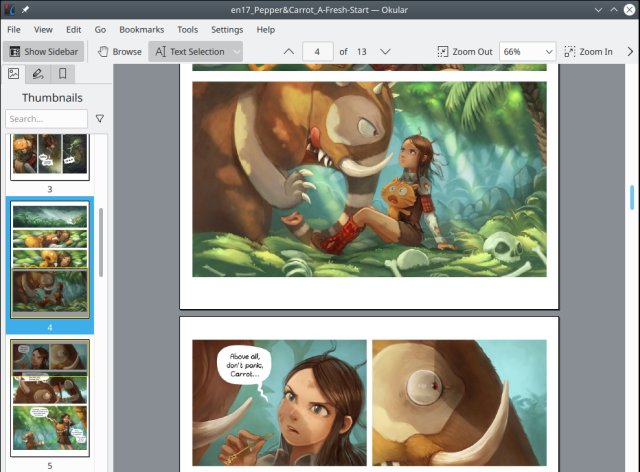
Multi-platform, fast and packed with features, Okular allows you to read PDF documents, comics and EPub books, browse images, visualize Markdown documents, and much more.
If you think a PDF viewer is just a simple tool for opening documents, Okular may surprise you. It is not just a reader—it is a powerful, flexible document workspace designed to help you read, understand, and interact with your files in a smarter way.
Developed by the KDE community, Okular is completely free and open-source. It runs on multiple platforms and continues to improve with regular updates, focusing on performance, usability, and modern features.
The latest version builds on this strong foundation, making Okular faster, more reliable, and more capable—while still keeping its clean, user-friendly design.
A “Universal” Document Viewer
Most PDF readers only handle PDFs. Okular takes a different approach.
It is often described as a “universal document viewer”, because it supports a wide variety of formats beyond PDF, including:
- eBooks (EPUB)
- Comic books (CBR, CBZ)
- Images (JPEG, PNG, TIFF)
- Technical formats like DjVu, XPS, and Markdown
This means you can open almost any document in one place, instead of switching between multiple apps.
For users who work with different types of files every day, this flexibility is a major advantage.
A Clean, Practical Interface
When you open Okular, the first thing you notice is how clear and organized everything feels.
The layout is designed to help you focus on your document:
- The main reading area is front and center
- A sidebar gives quick access to thumbnails, bookmarks, and table of contents
- Simple controls let you zoom, scroll, and navigate easily
You can quickly jump between pages, chapters, or sections without losing your place.
The goal is simple: help you find what you need, fast.
Powerful Annotation Tools
One of Okular’s standout features is its annotation system.
Instead of just reading a document, you can interact with it in meaningful ways:
- Highlight important text
- Add notes and comments
- Draw shapes or underline sections
- Insert text boxes directly onto the page
These annotations can be saved either separately or directly inside the PDF file, making them easy to share with others.
This turns Okular into more than a viewer—it becomes a study tool, review tool, and collaboration tool all in one.
Smart Navigation and Overview
Large documents can be overwhelming. Okular solves this with smart navigation features.
Thumbnail and Content Panels
You can:
- See page thumbnails for quick browsing
- Jump to specific chapters using the table of contents
- Use bookmarks to mark important sections
Overview Mode
A unique feature is overview mode, which lets you see multiple pages at once. This makes it easier to:
- Scan long documents
- Find specific sections visually
- Understand the structure of a file
These tools help you move through documents quickly and confidently.
Advanced Text Selection and Extraction
Okular gives you more control over text than most PDF readers.
You can:
- Select regular text for copying
- Select a rectangular area (useful for tables or diagrams)
- Extract content as images
This is especially useful when working with:
- Reports
- Research papers
- Data-heavy documents
It saves time and avoids the frustration of poorly formatted text copying.
Built-In Support for Forms and Signatures
Modern documents often include forms and digital signatures, and Okular handles both very well.
You can:
- Fill out PDF forms directly
- View and verify digital signatures
- Check whether a document has been modified since it was signed
- Even add your own digital signature
This makes Okular practical for everyday tasks like contracts, applications, and official documents.
Presentation Mode: Turn Documents Into Slides
A unique feature many users overlook is presentation mode.
With one click, your document becomes a full-screen presentation:
- Clean, distraction-free view
- Smooth page transitions
- Perfect for meetings or teaching
This is especially useful if you need to present PDFs without converting them into slides.
Accessibility and Reading Comfort
Okular includes several features designed to make reading easier:
- Text-to-speech support for listening to documents
- Adjustable zoom and scaling
- Color adjustment options (helpful for eye strain or visual impairments)
- Magnifier tool for detailed reading
These features make Okular more inclusive and comfortable for long reading sessions.
Fast, Efficient, and Environmentally Friendly
One of the key improvements in recent versions is better performance.
Okular is designed to be:
- Fast when opening documents
- Smooth when scrolling
- Efficient with system resources
It has even received recognition for being energy-efficient software, highlighting its low impact on system resources.
This means it runs well on both modern systems and older devices.
Customization and Control
Okular gives you control over how you work.
You can:
- Customize toolbars and shortcuts
- Choose different viewing modes (continuous, single-page, etc.)
- Adjust performance and rendering settings
This flexibility allows you to tailor the experience to your needs—whether you prefer simplicity or advanced control.
Privacy and Open-Source Freedom
Like many tools from the KDE community, Okular respects your privacy.
It does not:
- Track your activity
- Show ads
- Require an account
Because it is open-source, its code is publicly available, ensuring transparency and trust.
Works Across Platforms
Okular is available on:
- Linux
- Windows
- macOS
This makes it a reliable choice if you use multiple devices or switch between systems.
What Makes Okular Special?
There are many PDF viewers available, but Okular stands out for a few key reasons:
1. It Does More Than PDFs
It handles many document types in one place.
2. It Encourages Interaction
Annotations, notes, and highlights make reading active, not passive.
3. It Balances Power and Simplicity
It offers advanced features without feeling overwhelming.
4. It Respects Users
No ads, no tracking, no hidden costs.
Final Thoughts
Okular is not just another PDF viewer—it is a complete document-reading environment.
It combines:
- Wide format support
- Powerful annotation tools
- Smart navigation
- Strong privacy and performance
All in a package that is completely free and open.
Whether you are reading, studying, reviewing, or presenting documents, Okular gives you the tools to do it efficiently—and comfortably.
License: Free and open-source
Website: https://okular.kde.org/