7-Zip is free software with open source. The most of the code is under the GNU LGPL license. Some parts of the code are under the BSD 3-clause License. Also there is unRAR license restriction for some parts of the code. Read 7-Zip License information.
You can use 7-Zip on any computer, including a computer in a commercial organization. You don’t need to register or pay for 7-Zip.
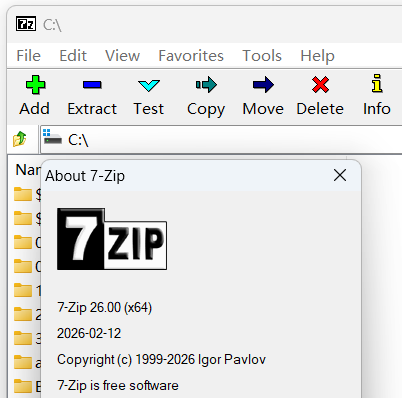
Software License: Free and open-source
Official Website: https://www.7-zip.org/
Download Link: https://www.7-zip.org/a/7z2600-x64.exe
System Support: Windows 11 / 10 / 8 / 7 / Vista / XP / 2022 / 2019 / 2016 / 2012 / 2008 / 2003 / 2000
Main Features:
- High compression ratio in 7z format with LZMA and LZMA2 compression
-
Supported formats:
- Packing / unpacking: 7z, XZ, BZIP2, GZIP, TAR, ZIP and WIM
- Unpacking only: APFS, AR, ARJ, CAB, CHM, CPIO, CramFS, DMG, EXT, FAT, GPT, HFS, IHEX, ISO, LZH, LZMA, MBR, MSI, NSIS, NTFS, QCOW2, RAR, RPM, SquashFS, UDF, UEFI, VDI, VHD, VHDX, VMDK, XAR and Z.
- For ZIP and GZIP formats, 7-Zip provides a compression ratio that is 2-10 % better than the ratio provided by PKZip and WinZip
- Strong AES-256 encryption in 7z and ZIP formats
- Self-extracting capability for 7z format
- Integration with Windows Shell
- Powerful File Manager
- Powerful command line version
- Plugin for FAR Manager
- Localizations for 87 languages
Additional Description:
In digital office and daily file management, an efficient, secure, and free compression and decompression tool is indispensable. As a free and open-source professional compression software, 7-Zip has been the first choice of hundreds of millions of users worldwide since it was launched by Russian developer Igor Pavlov in 2000. With its excellent performance, rich features, and zero-cost advantage, it is widely used in various scenarios such as personal office and enterprise operation and maintenance, completely solving the core needs of file compression, decompression, encryption, and management. Core Features, Covering All Scenarios- Ultra-High Compression Ratio: Adopting advanced LZMA and LZMA2 compression algorithms, its exclusive 7z format boasts an extremely high compression ratio, which can greatly save storage space compared with traditional compression formats. For ZIP and GZIP formats, the compression ratio is 2%-10% higher than that of PKZip and WinZip, with particularly obvious advantages when processing large files. For example, an 8M audio file can be compressed to 3.6-3.8M through standard compression, greatly improving file storage and transmission efficiency.
- Full Format Compatibility: Compatible with a variety of mainstream compression formats, including two-way compression/decompression support (7z, XZ, BZIP2, GZIP, TAR, ZIP, WIM), and decompression-only support (more than 30 formats such as APFS, AR, ARJ, CAB, ISO, RAR, DMG). No need to install additional tools, easily handle all types of compressed files, especially suitable for processing special format files such as ISO images and RAR compressed packages.
- Bank-Level Security Encryption: Supports strong AES-256 encryption algorithm in 7z and ZIP formats, which can set password protection for compressed packages and encrypt file names, effectively preventing sensitive data leakage. It is suitable for scenarios such as transmitting confidential files and personal privacy data, balancing convenience and security.
- Convenient Operation Experience: Supports self-extracting function for 7z format, allowing decompression without installing software, facilitating file sharing; deeply integrated with Windows Shell, enabling quick compression and decompression operations with a right click, no cumbersome steps required; built-in powerful file manager and command line version to meet the different operation needs of ordinary users and professional users, and supports FAR Manager plugin extension functions.
- Multi-Language and Multi-System Adaptation: Supports localization in 87 languages, including Simplified Chinese, adapting to the usage habits of users in different regions; perfectly compatible with the entire series of Windows systems such as Windows 11, 10, 8, 7, from the old XP system to the latest Windows 11, from 32-bit to ARM64 architecture, all can run stably. At the same time, it provides a command-line ported version (p7zip) for Linux and Unix platforms, adapting to multi-scenario usage needs.
- Completely Free and Open-Source: Distributed under the GNU LGPL license agreement, some codes follow the BSD 3-clause license agreement. There is no hidden charge, no registration or activation required, and it can be freely used in various scenarios such as personal and commercial use. Enterprise users do not need to worry about authorization issues, which greatly reduces the use cost compared with paid software. The open-source feature ensures that the software security is traceable and verifiable.
- Lightweight and Ad-Free: The software itself is extremely small, with the latest 64-bit installation package only 1.6MB, occupying less system resources, and the installation is fast (can be completed in only 2 steps). There are no pop-up ads or bundled software throughout the process, the interface is simple and clean, avoiding unnecessary interference and improving the operation experience.
- Stable, Efficient and Low-Consumption: After years of iteration and optimization, the software runs stably without freezes or crashes, and the compression and decompression speed is balanced. Although the compression speed is slightly inferior to similar tools in some scenarios, the ultra-high compression ratio is enough to make up for this deficiency. It supports advanced skills such as solid compression and large dictionary compression, and can customize compression parameters according to needs, balancing efficiency and effect.
- Balance of Usability and Professionalism: The interface is simple and intuitive, allowing ordinary users to get started quickly without learning, and the basic operations are consistent with similar tools. At the same time, it provides rich advanced functions such as split-volume compression, batch processing, and command-line script automation, meeting the high-level needs of professional users such as IT practitioners and enterprise operation and maintenance personnel, and adapting to different user groups.