Databases are everywhere. They power websites, store app data, and organize everything from personal notes to business records. But working with databases can often feel technical and intimidating—especially if you’re not a programmer.
That’s where DB Browser for SQLite comes in.
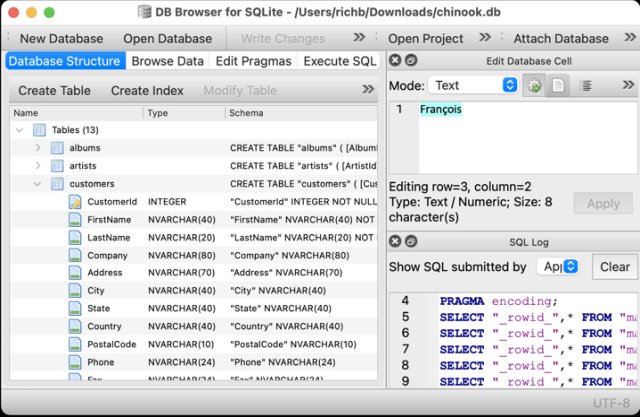
DB Browser for SQLite (often called DB4S) is a free, open-source tool designed to make working with databases simple and visual. Instead of writing complex commands from scratch, you can interact with your data through an intuitive interface that feels familiar and easy to understand.
Whether you’re exploring data, editing records, or building a database from scratch, DB4S gives you the tools to do it confidently.
What Is SQLite—and Why It Matters
Before diving deeper, it helps to understand what SQLite is.
SQLite is a lightweight database system that stores everything in a single file. It doesn’t require a server, setup process, or complicated configuration.
This makes it ideal for:
- Applications
- Small to medium projects
- Personal data storage
- Embedded systems
DB Browser for SQLite is built specifically to work with these database files, giving you full control over them.
A Visual Interface That Feels Familiar
One of the biggest strengths of DB4S is its spreadsheet-like interface.
When you open a database:
- Tables are displayed clearly
- Rows and columns look like a familiar grid
- You can click, edit, and navigate easily
This design removes much of the complexity usually associated with databases. Instead of thinking in abstract terms, you can simply see and interact with your data directly.
Create and Manage Databases with Ease
DB4S makes it easy to build and manage databases from the ground up.
You can:
- Create new database files
- Open existing ones
- Compact (optimize) databases to save space
All of this is done through simple menus and guided steps, so you don’t need deep technical knowledge to get started.
Full Control Over Tables and Structure
Tables are the core of any database, and DB4S gives you complete control over them.
You can:
- Create new tables
- Define columns and data types
- Modify existing structures
- Delete tables when no longer needed
The interface includes helpful controls and wizards that guide you through the process, making it much easier than writing raw commands.
Work with Data Like a Spreadsheet
One of the most satisfying features of DB4S is how it lets you browse and edit data directly.
You can:
- View records in a table
- Add new entries
- Edit existing data
- Delete rows
It feels similar to working in a spreadsheet, which makes it accessible even for beginners.
Search, Sort, and Explore Data
When working with large datasets, finding specific information quickly is essential.
DB4S provides tools to:
- Sort records by different columns
- Search for specific values
- Filter results
This makes it easy to explore your data and understand what’s inside your database.
Powerful SQL Query Support
While the visual interface is great, DB4S also includes a full SQL query editor for advanced users.
You can:
- Write custom SQL queries
- Execute them instantly
- View results in a clear format
This means you can combine simplicity with power:
- Use the interface for everyday tasks
- Switch to SQL when you need more control
It’s a flexible approach that supports both beginners and experienced users.
Import and Export Made Simple
Data rarely stays in one place, and DB4S makes it easy to move information in and out of your database.
You can:
- Import data from text files
- Import and export tables as CSV files
- Export entire databases as SQL dump files
This is especially useful for:
- Sharing data
- Backing up information
- Integrating with other tools
Track What Happens Behind the Scenes
DB4S includes a feature that shows a log of all SQL commands executed by the application.
This is helpful because:
- You can see exactly what actions are being performed
- It helps you learn how SQL works
- It provides transparency and control
For those learning databases, this feature can be a valuable teaching tool.
Visualize Data with Simple Graphs
Understanding data is often easier when you can see it visually.
DB4S allows you to:
- Create simple graphs from tables or query results
- Get a quick visual overview of your data
While not as advanced as dedicated analytics tools, this feature is useful for quick insights and exploration.
Encryption Support for Security
Security is an important part of working with data.
DB4S supports SQLCipher encryption, allowing you to:
- Add encryption to database files
- Remove encryption if needed
- Change encryption settings
This helps protect sensitive data and ensures that only authorized users can access it.
Cross-Platform Compatibility
DB Browser for SQLite works across multiple operating systems:
- Windows
- macOS
- Linux and Unix systems
This makes it a flexible choice, whether you’re working on a personal computer, a workstation, or a development environment.
Lightweight but Powerful
Despite its wide range of features, DB4S remains:
- Lightweight
- Fast
- Easy to install
It doesn’t require complex setup or heavy system resources, making it accessible to a wide range of users.
Open-Source and Community-Driven
DB4S is open-source, which means:
- It is free to use
- Its code is publicly available
- It benefits from community contributions
There is also a wiki and documentation available to help users learn and solve problems.
Who Is DB Browser for SQLite For?
DB4S is suitable for many types of users:
Beginners
- Learn how databases work
- Explore data visually
Developers
- Build and test applications
- Manage SQLite databases efficiently
Data Enthusiasts
- Analyze and organize information
- Work with structured data
What Makes DB4S Stand Out?
Among database tools, DB Browser for SQLite stands out for several reasons:
1. Visual Simplicity
It makes databases easy to understand and use.
2. Full Functionality
You get access to the complete power of SQLite.
3. Flexibility
It supports both visual editing and SQL queries.
4. Accessibility
It works across platforms and requires minimal setup.
Final Thoughts
DB Browser for SQLite is a powerful yet approachable tool that bridges the gap between simplicity and functionality.
It offers:
- A clear, spreadsheet-like interface
- Full control over database structure and data
- Strong import/export capabilities
- Advanced features like SQL queries and encryption
All of this comes in a free, open-source package that is easy to install and use.
Whether you’re just starting to explore databases or managing real-world data, DB4S provides a reliable and user-friendly way to get the job done.
License: Free and open-source
Website: https://sqlitebrowser.org/