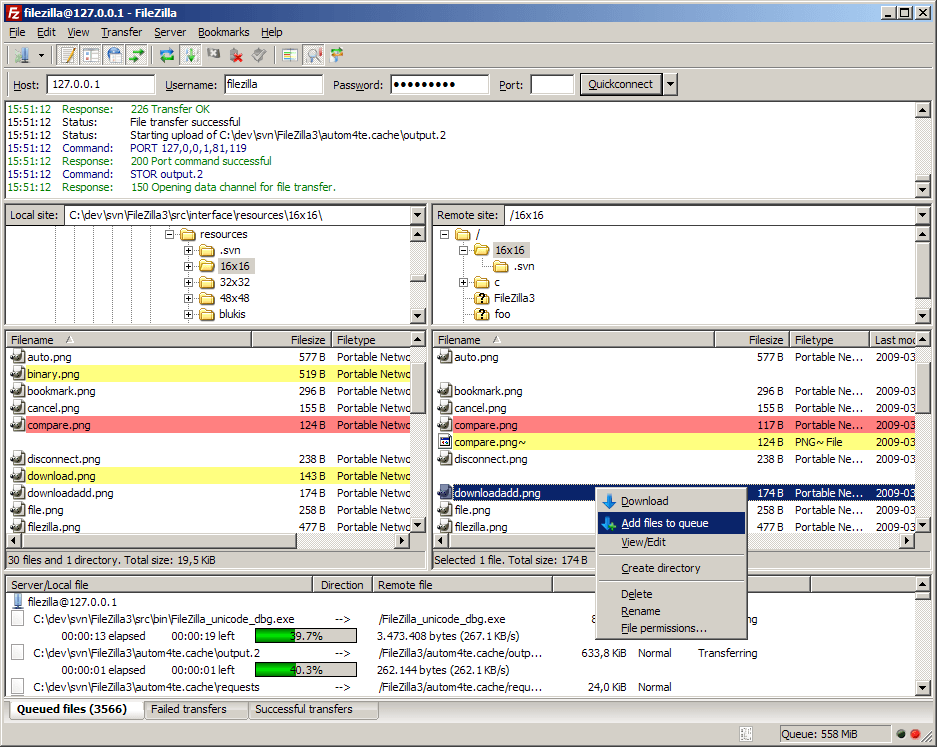
Transferring files between your computer and a remote server is a common task in web development, content management, and IT workflows. Whether you are uploading a website, managing server files, or backing up data, you need a tool that is both reliable and easy to use. FileZilla has long been one of the most trusted solutions for this purpose, offering a powerful yet accessible experience.
The latest evolution of FileZilla continues to build on its strong foundation, delivering fast, secure, and flexible file transfer capabilities for users of all skill levels.
Simple to Learn, Easy to Use
One of FileZilla’s greatest strengths is its simplicity. From the moment you open the application, the interface is clear and straightforward.
You can quickly:
- Connect to a server
- Browse files on your local and remote systems
- Transfer files with drag and drop
Even if you are new to file transfer tools, FileZilla makes it easy to get started. At the same time, it provides advanced features that experienced users can take full advantage of.
Support for Multiple Secure Protocols
FileZilla supports a range of file transfer protocols, ensuring compatibility with different servers and environments.
It includes:
- Standard FTP (File Transfer Protocol)
- FTPS (FTP over SSL/TLS) for encrypted connections
- SFTP (SSH File Transfer Protocol) for secure transfers over SSH
These options allow you to choose the level of security and compatibility that best fits your needs. Secure protocols help protect your data during transfer, which is especially important when handling sensitive files.
Cross-Platform Flexibility
FileZilla is designed to work across multiple operating systems, including Windows, macOS, Linux, and BSD variants. This ensures a consistent experience regardless of your platform.
You can switch between systems without needing to learn a new tool, making FileZilla a convenient choice for individuals and teams working in different environments.
Handles Large Files with Ease
Modern workflows often involve large files, such as videos, backups, or datasets. FileZilla is built to handle these efficiently.
It supports:
- File transfers larger than 4GB
- Resume functionality for interrupted transfers
If a transfer is interrupted due to network issues, you can resume it without starting over. This saves time and reduces frustration, especially when working with large files.
Tabbed Interface for Better Organization
FileZilla’s tabbed interface allows you to manage multiple connections at once. You can open several server sessions in different tabs and switch between them easily.
This is particularly useful if you:
- Work with multiple websites
- Manage several servers
- Need to compare or move files between locations
The interface helps keep everything organized and accessible.
Powerful Site Manager
The built-in Site Manager is one of FileZilla’s most useful features. It allows you to save connection details for different servers, including login credentials and settings.
With Site Manager, you can:
- Quickly reconnect to frequently used servers
- Organize connections into folders
- Manage multiple configurations بسهولة
This eliminates the need to re-enter details each time you connect, improving efficiency.
Efficient Transfer Queue
FileZilla includes a robust transfer queue system that lets you manage multiple file transfers at once.
You can:
- Add files to a queue
- Prioritize certain transfers
- Monitor progress in real time
This feature is especially helpful when handling large batches of files, as it keeps everything organized and ensures smooth processing.
Drag-and-Drop Simplicity
Transferring files in FileZilla is as easy as dragging them from one panel to another. The interface shows your local files on one side and remote files on the other.
This visual approach makes file management intuitive and reduces the need for complex commands.
Advanced File Management Features
FileZilla goes beyond basic transfers by offering tools that help you manage files more effectively.
Directory Comparison
You can compare local and remote directories to identify differences. This helps ensure that your files are synchronized and up to date.
Synchronized Browsing
When enabled, navigating one directory automatically updates the other. This makes it easier to keep track of corresponding folders.
Remote File Search
You can search for files directly on the server, saving time when working with large directories.
Remote File Editing
FileZilla allows you to edit files directly on the server. When you open a file, it is downloaded, edited locally, and then automatically uploaded back to the server.
This feature is particularly useful for quick updates, such as:
- Editing website files
- Updating configuration settings
- Fixing small issues
Speed Control and Stability
FileZilla gives you control over transfer speeds, allowing you to set limits if needed. This can be useful when you want to avoid using too much bandwidth.
It also includes a keep-alive feature that maintains connections during long sessions, reducing the risk of disconnections.
Network Configuration Made Easy
Setting up network connections can sometimes be challenging, especially with firewalls or routers. FileZilla includes a network configuration wizard that helps you adjust settings for optimal performance.
This ensures that your transfers run smoothly, even in more complex network environments.
Broad Compatibility and Proxy Support
FileZilla supports IPv6 and works with various proxy types, including HTTP and SOCKS5. This makes it adaptable to different network setups and requirements.
Logging and Transparency
FileZilla keeps detailed logs of file transfers and connections. These logs can be saved for later review, which is useful for troubleshooting or tracking activity.
Multilingual and Accessible
FileZilla is available in many languages, making it accessible to users around the world. Its clear interface and helpful features ensure that users of all experience levels can use it effectively.
A Tool That Balances Power and Simplicity
What makes FileZilla stand out is its balance. It is simple enough for beginners to use immediately, yet powerful enough to handle professional tasks.
You can:
- Transfer files quickly
- Manage multiple servers
- Maintain secure connections
- Handle large and complex workflows
All within a single application.
Conclusion: A Trusted Solution for File Transfers
FileZilla remains one of the most reliable and widely used file transfer tools available. Its combination of ease of use, strong security, and advanced features makes it suitable for a wide range of users.
Whether you are managing a website, transferring large files, or working with remote servers, FileZilla provides a dependable and efficient solution. It simplifies complex tasks and helps you stay productive, no matter your level of experience.
Download: https://download.filezilla-project.org/client/FileZilla_3.69.6_win64_sponsored2-setup.exe
License: Free and open-source
Website: https://filezilla-project.org/