In today’s digital landscape, video content comes in many formats, sizes, and qualities. Whether you are preparing videos for sharing, archiving media, or optimizing files for different devices, having a reliable video converter is essential. HandBrake stands out as one of the most trusted tools in this space, offering a balance of simplicity, performance, and advanced control.
Completely free and open source, HandBrake has earned a strong reputation for turning complex video encoding tasks into a manageable and efficient process. Its latest experience continues to refine this approach, making it accessible for beginners while still offering powerful features for advanced users.
A Free and Open Source Video Converter
HandBrake is built on a foundation of openness and accessibility. It is completely free to use, with no restrictions on features. This makes it an excellent choice for anyone who needs a dependable video conversion tool without additional costs.
Because it is open source, HandBrake is continuously improved by a global community. This ensures regular updates, strong reliability, and ongoing support for modern video standards.
Quick Start with Built-in Presets
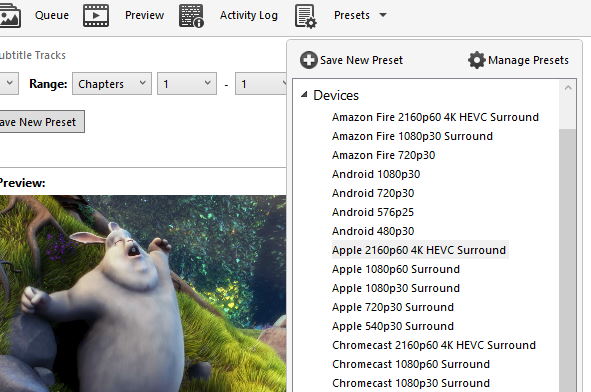
One of HandBrake’s most user-friendly features is its built-in device presets. These presets allow you to start converting videos in seconds.
You can simply:
- Choose a profile optimized for your device
- Select a universal preset for standard or high-quality output
- Start the conversion process immediately
This approach removes guesswork, making it easy for beginners to achieve good results without adjusting technical settings.
At the same time, advanced users can dive deeper and customize every aspect of the encoding process. This flexibility ensures that HandBrake works for both simple and complex workflows.
Wide Support for Input Sources
HandBrake is designed to handle a broad range of media inputs. It supports most common multimedia file formats, making it easy to import videos from different sources.
It can also process DVD and Blu-ray content that does not include copy protection. This allows you to convert physical media into digital formats for easier storage and playback.
Flexible Output Options
HandBrake offers a variety of output formats and encoding options, giving you control over how your final video looks and behaves.
Supported File Formats
- MP4
- MKV
- WebM
These formats are widely compatible, ensuring your videos can be played across different devices and platforms.
Video Encoding Options
HandBrake supports modern and widely used codecs, including:
- AV1
- H.265 (HEVC)
- H.264 (AVC)
- MPEG-4 and MPEG-2
- VP8 and VP9
These options allow you to balance quality, file size, and compatibility depending on your needs.
Hardware Acceleration
For faster performance, HandBrake can use hardware acceleration when available. This significantly reduces encoding time, especially for large or high-resolution videos.
Advanced Audio Support
Audio is an important part of any video, and HandBrake provides strong support for a wide range of audio formats.
Audio Encoding Formats
- AAC and HE-AAC
- MP3
- FLAC
- AC3 and E-AC3
- Opus and Vorbis
Audio Pass-Through
HandBrake also supports audio pass-through, allowing you to keep the original audio track without re-encoding. This preserves quality and speeds up the process.
Supported pass-through formats include:
- AC-3, DTS, TrueHD
- AAC, MP3, Opus
- And more
Precise Control Over Video Encoding
For users who want more control, HandBrake offers detailed encoding settings.
You can choose between:
- Constant Quality: Maintains consistent visual quality throughout the video
- Average Bitrate: Targets a specific file size or bitrate
It also supports both variable frame rate (VFR) and constant frame rate (CFR), giving you flexibility depending on your project requirements.
Built for Efficiency: Batch Processing and Queueing
HandBrake is designed to handle multiple tasks efficiently. Its batch processing and queue system allow you to convert several files in sequence.
You can:
- Add multiple videos to a queue
- Apply presets or custom settings
- Let HandBrake process everything automatically
This is especially useful when working with large collections of media.
Chapter and Subtitle Support
HandBrake includes tools for managing chapters and subtitles, making it ideal for more structured video content.
Chapter Features
- Select specific titles or chapters
- Add or preserve chapter markers
Subtitle Support
- VobSub
- Closed Captions (CEA-608)
- SSA and SRT
These features allow you to create videos that are more accessible and easier to navigate.
Built-in Video Filters
HandBrake includes a range of video filters that help improve or adjust your footage.
These include:
- Deinterlacing and Decomb
- Noise reduction
- Detelecine
- Deblocking
- Grayscale and color adjustments
- Cropping and scaling
These tools help you refine your video and achieve better visual quality.
Real-Time Preview and Fine-Tuning
To make the editing process easier, HandBrake provides live previews of your settings. You can see how your adjustments will affect the final output before starting the full conversion.
This helps you:
- Avoid mistakes
- Fine-tune quality and performance
- Save time by reducing trial and error
HDR and Modern Video Support
HandBrake supports HDR pass-through, allowing you to maintain high dynamic range content when converting compatible videos. This ensures that modern video formats retain their visual depth and color accuracy.
A Tool That Grows with Your Needs
HandBrake is designed to be both simple and powerful. Beginners can rely on presets to get started quickly, while advanced users can explore detailed settings to optimize every aspect of their videos.
This balance makes it suitable for a wide range of tasks, from casual conversions to more demanding projects.
Conclusion: A Complete Solution for Video Conversion
HandBrake is more than just a video converter—it is a flexible and reliable tool that adapts to your needs. With its free and open source foundation, wide format support, powerful encoding options, and user-friendly presets, it offers a complete solution for handling video files.
Whether you are preparing content for sharing, saving space, or improving playback compatibility, HandBrake provides the tools you need to achieve high-quality results efficiently.
License: Free and open-source
Website: https://handbrake.fr/