In a world filled with heavy and complex image software, IrfanView offers a refreshing alternative. It is fast, compact, and surprisingly powerful, making it one of the most practical tools for handling images and multimedia files. Whether you are quickly viewing photos, organizing folders, or making edits, IrfanView provides a smooth and efficient experience.
The latest evolution of IrfanView continues to refine its core philosophy: keep things simple, fast, and flexible—while still offering advanced features for those who need them.
A Small Program with Big Capabilities
One of the first things you will notice about IrfanView is how lightweight it is. It runs quickly, launches almost instantly, and does not demand much from your system.
Despite its small size, it supports both 32-bit and 64-bit environments and offers a wide range of features that rival much larger programs. This balance between performance and functionality is what makes IrfanView so appealing.
It is also distributed as a single executable file, meaning there are no unnecessary components or complicated installations. There are no intrusive messages or forced changes to your system, giving you full control over how you use it.
Broad File Format Support
IrfanView is known for its ability to handle a wide variety of file formats. From common image types like JPG, PNG, and GIF to more specialized or less common formats, it opens files quickly and reliably.
This makes it a convenient all-in-one viewer. Instead of installing multiple programs for different file types, you can rely on IrfanView to handle most of them in one place.
It also supports multimedia files, allowing you to view images, play videos, and listen to audio within the same application.
Fast Navigation and Thumbnail Viewing
When working with large collections of images, speed matters. IrfanView offers a fast directory view that lets you move through folders effortlessly.
The built-in thumbnail and preview options make it easy to:
- Browse large image collections
- Quickly identify files
- Select images for editing or sharing
This feature is especially useful for photographers, designers, or anyone managing a large number of files.
Simple Yet Effective Editing Tools
IrfanView is not just a viewer—it also includes a range of editing tools that are easy to use.
You can:
- Crop and resize images
- Adjust color depth
- Rotate images without quality loss
- Add text or image overlays (such as watermarks)
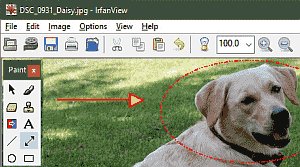
The built-in paint tools allow you to draw lines, circles, arrows, and more. These simple features are perfect for quick edits, annotations, or highlighting details.
Lossless Editing for JPEG Files
A standout feature of IrfanView is its support for lossless JPEG operations. This means you can rotate, crop, or adjust certain properties of JPEG images without reducing their quality.
This is particularly valuable when working with photos, as it preserves the original detail while making necessary adjustments.
Batch processing is also supported, allowing you to apply these changes to multiple files at once—saving time and effort.
Powerful Batch Conversion
IrfanView includes a highly efficient batch conversion system. This feature allows you to process large numbers of files automatically.
You can:
- Convert formats
- Resize images
- Rename files
- Apply filters and adjustments
The process is fast and supports multithreading, making it ideal for handling large projects.
Slideshow and Presentation Features
Creating slideshows with IrfanView is simple and flexible. You can display your images in fullscreen mode with smooth transitions and additional information such as EXIF data or comments.
You can also export slideshows as:
- Video files (such as MP4)
- Executable files
- Screensavers
This makes it easy to share presentations or create visual content without additional tools.
Advanced Features for Power Users
While IrfanView is beginner-friendly, it also includes advanced features for experienced users.
These include:
- Support for Adobe Photoshop filters
- Multipage TIFF editing
- IPTC metadata editing
- Embedded color profile support
You can also use command-line options and customizable hotkeys to streamline your workflow. This level of control makes IrfanView suitable for more technical or professional use.
Customizable Interface and Dark Mode
IrfanView allows you to personalize your experience through toolbar skins and layout options. You can adjust the interface to suit your preferences and workflow.
Dark mode support is another welcome feature, providing a more comfortable viewing experience in low-light environments.
Screen Capture and Additional Tools
Beyond image viewing and editing, IrfanView includes a range of extra tools that enhance its usefulness.
These include:
- Screen capturing
- File searching
- Email integration
- Printing support
- Icon extraction from files
It also supports scanning, including batch scanning, making it a versatile tool for both digital and physical media workflows.
Plugins and Extendability
IrfanView supports a wide range of plugins that expand its functionality. These plugins allow you to add support for additional file formats, effects, and tools.
This modular approach means you can customize IrfanView to meet your specific needs without adding unnecessary features.
Multi-Language and Unicode Support
IrfanView is designed for global use, with support for multiple languages and full Unicode compatibility. This ensures that it works smoothly with files and text from different regions and languages.
A Tool That Balances Speed and Functionality
What makes IrfanView unique is its ability to combine speed, simplicity, and power in one package. It does not overwhelm you with complexity, yet it provides enough tools to handle a wide range of tasks.
You can use it for:
- Quick image viewing
- Basic editing
- Batch processing
- Multimedia playback
All within a single, lightweight application.
Conclusion: A Reliable Everyday Companion
IrfanView proves that powerful software does not need to be large or complicated. Its fast performance, wide format support, and practical features make it an excellent choice for everyday use.
Whether you are managing photos, editing images, or simply browsing files, IrfanView offers a dependable and efficient solution. It adapts to your needs, whether you are a beginner looking for simplicity or an advanced user seeking control.
If you value speed, flexibility, and ease of use, IrfanView is a tool that continues to stand the test of time.
License: Free (for non-commercial use)
Website: https://www.irfanview.com/